


Руководство по модернизации BMW X3 F25 2011–2017: стоит ли обновлять экран, цифровую приборную панель или и то, и другое?
Руководство по модернизации BMW X3 F25: экран, цифровая приборная панель или оба?
Если ваш F25 всё ещё едет так, как вам нужно, старый экран или аналоговая приборная панель — не веская причина менять весь BMW. Полезное решение проще: какая часть салона теперь заставляет машину казаться старше каждый раз, когда вы ею пользуетесь?
Если навигация, использование телефона и центральный дисплей вызывают раздражение, начните с Android-экрана. Если центральная система устраивает, но вид через рулевое колесо кажется устаревшим, начните с цифровой приборной панели. Если обе зоны вас беспокоят и вы планируете оставить X3, модернизация обеих может создать более целостную современную кабину.
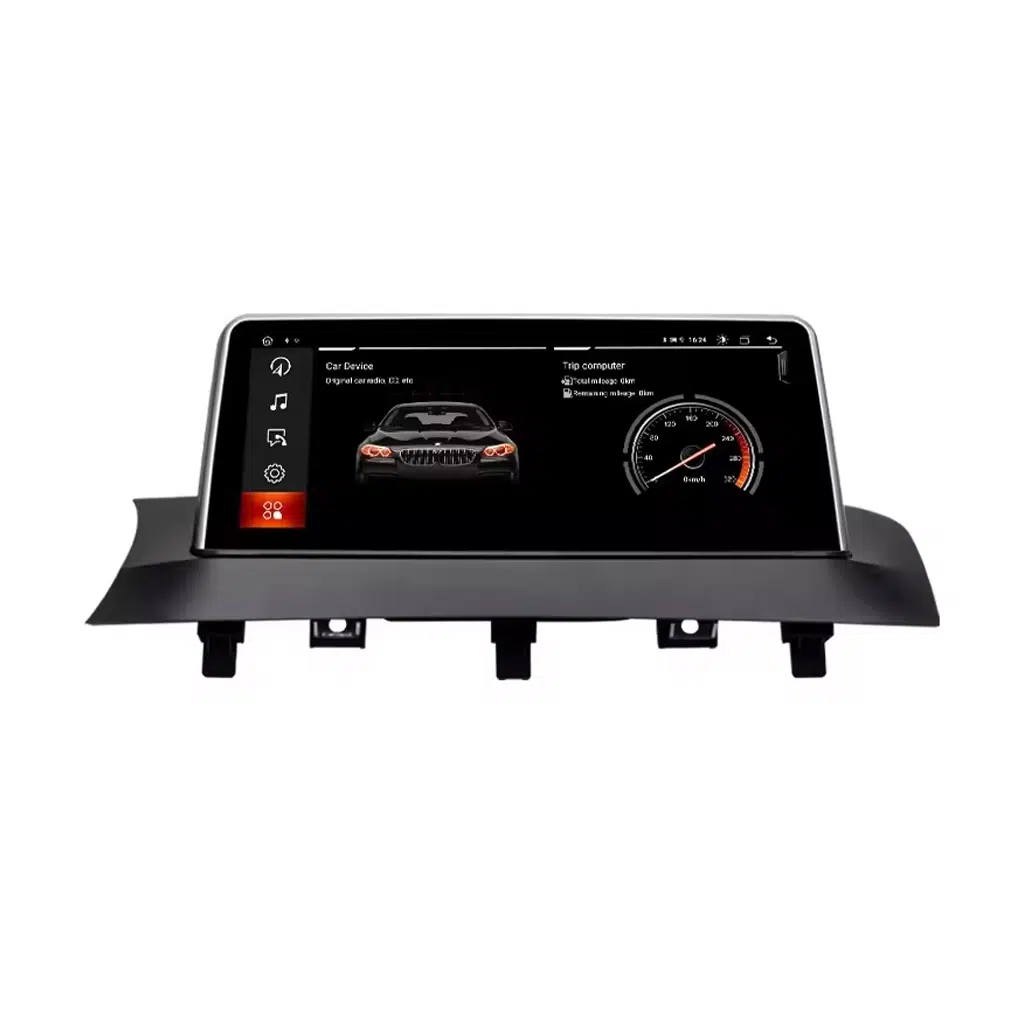
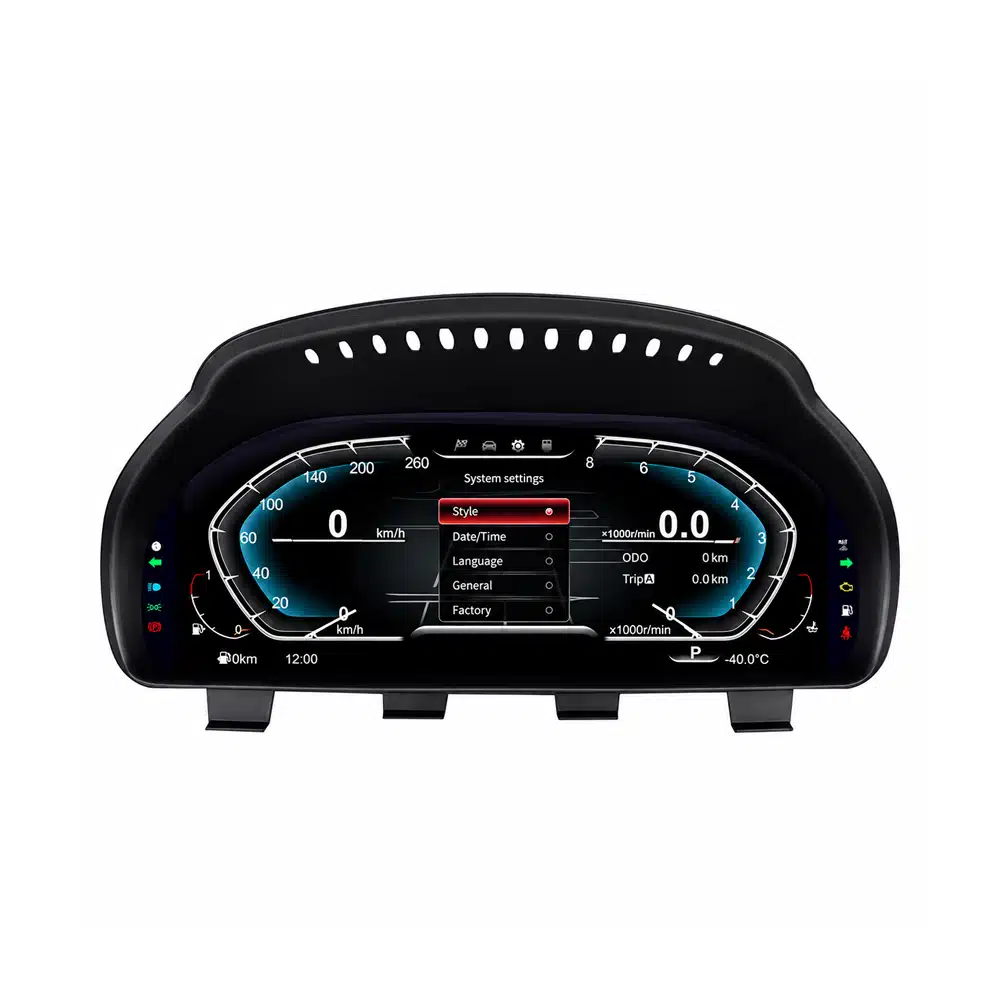
Руководство по модернизации BMW X3 F25: что стоит модернизировать в первую очередь?
Правильная первая покупка определяется не тем, у какого продукта самый длинный список функций. Она определяется тем, какую часть вашего BMW вы замечаете не по той причине каждый раз, когда едете.
Выберите этот маршрут, если ваше ежедневное раздражение — это устаревшее представление iDrive, ограниченная интеграция телефона, маленький оригинальный дисплей или зависимость от отдельного телефона для навигации.
- Беспроводной Apple CarPlay
- Android Auto
- Навигация и мультимедийные функции Android
- Сохранение оригинальных органов управления на подходящем маршруте
Выберите этот маршрут, когда основной визуальный разрыв находится прямо за рулевым колесом. 12.3-дюймовая приборная панель модернизирует информационную зону, на которую вы смотрите при каждой поездке.
- 12.3-дюймовый дисплей IPS 1920×720
- Apple CarPlay и Android Auto
- Несколько цифровых тем приборной панели
- Поддерживаемая оригинальная водительская информация BMW
Преимущество установки обоих не просто в наличии двух экранов. Это визуальная согласованность: центр приборной панели и вид водителя больше не выглядят как относящиеся к двум разным эпохам.
- Современная интеграция телефона в центральном дисплее
- Современная цифровая кабина для водителя
- Один автомобиль с одной историей поддержки
- Более сильное долгосрочное улучшение владения
Руководство по апгрейду BMW X3 F25: названия моделей 2011–2017 для США, Европы, Великобритании и других рынков
Важный идентификатор для этой статьи — Поколение BMW X3 F25. Шильдики двигателя и трансмиссии различаются в зависимости от страны и модельного года. Шильдик, такой как xDrive28i или xDrive20d, не отменяет необходимости подтвердить оригинальную конфигурацию экрана и электроники.
| Рынок / Обычное поисковое название | Поколение | Распространённые шильдики F25 | Годы, актуальные для этого руководства | Что важно для апгрейда |
|---|---|---|---|---|
|
США / Канада BMW X3 / BMW X3 SAV |
F25 | xDrive28i, xDrive35i, позже sDrive28i и xDrive28d в зависимости от модельного года | 2011–2017 | Подтвердите шасси F25 и оригинальную систему экрана CIC/NBT. |
|
Соединённое Королевство / Европа BMW X3 |
F25 | sDrive18d, xDrive20d, xDrive30d, xDrive35d, sDrive20i, xDrive20i, xDrive28i, xDrive35i в зависимости от страны и года | 2011–2017 | Шильдик двигателя вторичен; оригинальная информационно-развлекательная система и конфигурация автомобиля — ключевые проверки. |
|
Австралия / Новая Зеландия / Ближний Восток / Азия BMW X3 |
F25 | Местные бензиновые и дизельные варианты sDrive / xDrive из того же семейства F25 | 2011–2017 | Перед отправкой подтвердите поколение F25, положение руля и оригинальный экран/кластер. |
Руководство по модернизации BMW X3 F25: когда центральный экран — это первое, что вы замечаете
Вам всё ещё может нравиться посадка, рулевое управление, практичность и то, как едет F25. Затем вы отправляетесь в поездку, и разрыв в возрасте становится очевидным: телефон управляет картами, музыкой и звонками, а заводской дисплей вносит всё меньше и меньше.
Современный центральный дисплей меняет рутину, а не просто внешний вид. Беспроводные CarPlay или Android Auto переносят функции, которыми вы уже пользуетесь, на приборную панель, а система Android обеспечивает более крупный современный интерфейс для навигации и мультимедиа.
Причина для покупки — не “экран побольше”.” Причина в том, что BMW становится проще использовать каждый день, не заменяя автомобиль, который вы уже знаете.
Да. Текущий маршрут Android-экрана iKAGOO для F25 поддерживает беспроводные Apple CarPlay и Android Auto после правильного согласования с оригинальной системой BMW.
Этот маршрут имеет наибольший смысл, когда проблема, которую вы хотите решить, — это интеграция телефона, навигация и удобство использования центрального дисплея.
Это более сильный маршрут, когда вы хотите больше, чем проекцию телефона, и сам оригинальный центральный дисплей — часть того, что заставляет автомобиль казаться устаревшим.
Полноценное Android-головное устройство меняет размер и подачу интерфейса, а также добавляет современную интеграцию телефона. Простого адаптера может быть достаточно, если вас полностью устраивает оригинальный экран.
Руководство по модернизации BMW X3 F25: когда именно приборная панель заставляет кокпит казаться старым
Это другая причина для покупки, чем замена центрального экрана. Приборная панель находится в вашем прямом поле зрения, поэтому её замена меняет ту часть кокпита, которую вы естественно видите на протяжении каждой поездки.
Текущая приборная панель iKAGOO для F25 использует 12.3-дюймовый IPS-дисплей 1920×720, поддерживает Apple CarPlay и Android Auto, предоставляет несколько тем приборной панели и сохраняет поддерживаемую оригинальную информацию о вождении BMW.
Вам не нужно заменять центральный дисплей только потому, что вы хотите более современный цифровой опыт вождения. Если проблема в зоне приборной панели, сначала решите именно эту зону.

Yes, when the analog instrument area is the part of the cabin that now feels older than the rest of the BMW.
The upgrade affects the visual area you see on every drive rather than adding a feature you only use occasionally.
Yes. The current iKAGOO BMW X3 F25 Digital Cluster supports both Apple CarPlay and Android Auto.
This is useful for owners who want a modern driver-facing digital experience without necessarily replacing the center infotainment screen at the same time.
BMW X3 F25 Upgrade Guide: When Upgrading Both Screens Makes More Sense
Doing both is not necessary for every owner. It becomes more compelling when you expect to keep the F25 for several more years and both the center display and analog driver display now make the cabin feel older than the rest of the vehicle.
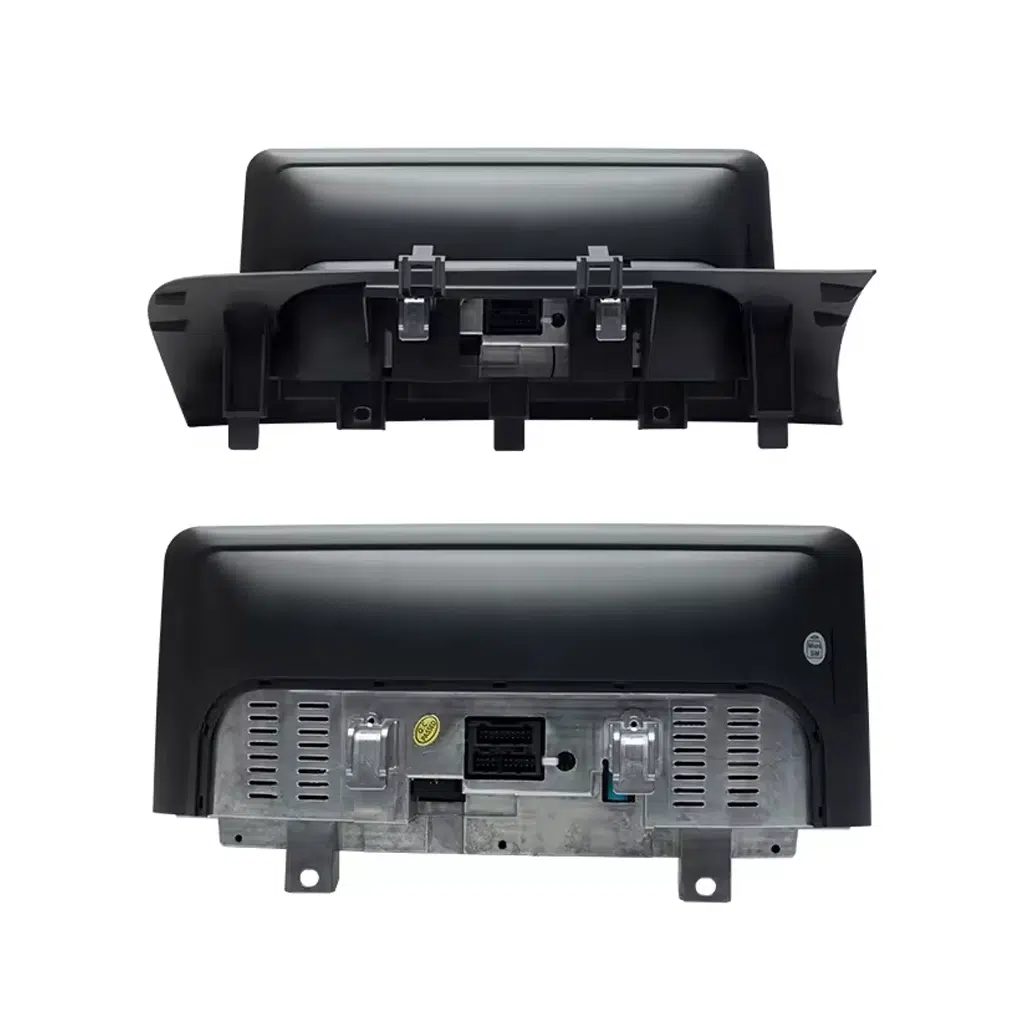
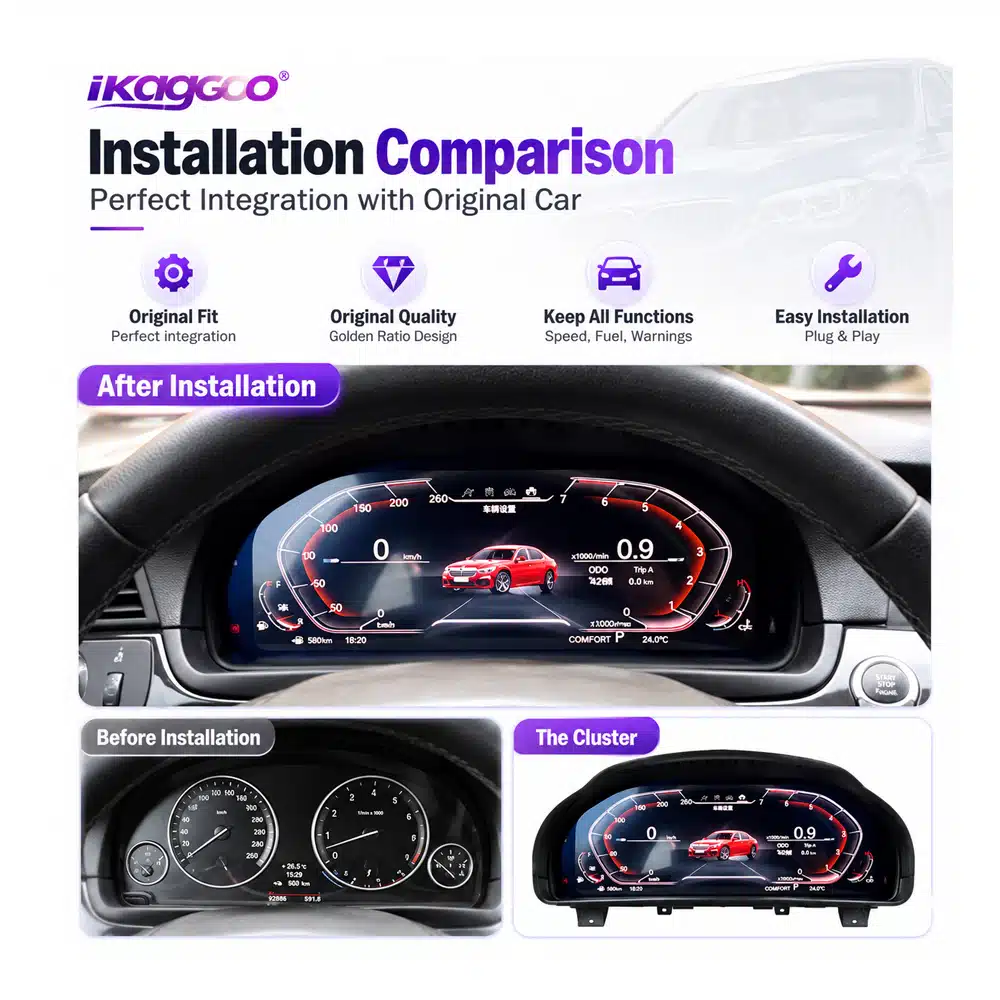
If only one side of the cockpit is modernized, the other can become more noticeable. When both areas already bother you, upgrading the center display and cluster can make the dashboard feel like one coherent interior again.
This is particularly relevant for an owner who bought a good used F25, knows the vehicle is mechanically worth keeping and wants to improve the parts experienced on every journey.
BMW X3 F25 Upgrade Guide: What Should You Change First After Buying a Used X3?
Start with the Android screen. It changes navigation, phone integration, music and the interface you interact with during normal driving.
Start with the digital cluster. It changes the visual area directly in front of you without requiring you to replace a center screen you still like.
Upgrade in stages or complete both areas. The right order is the one that solves your biggest current frustration first.
BMW X3 F25 Upgrade Guide: Four Risks to Solve Before You Spend the Money
A low advertised product price is not automatically the lowest final cost if fitment, customs charges, installation support and future repair options are still unknown.
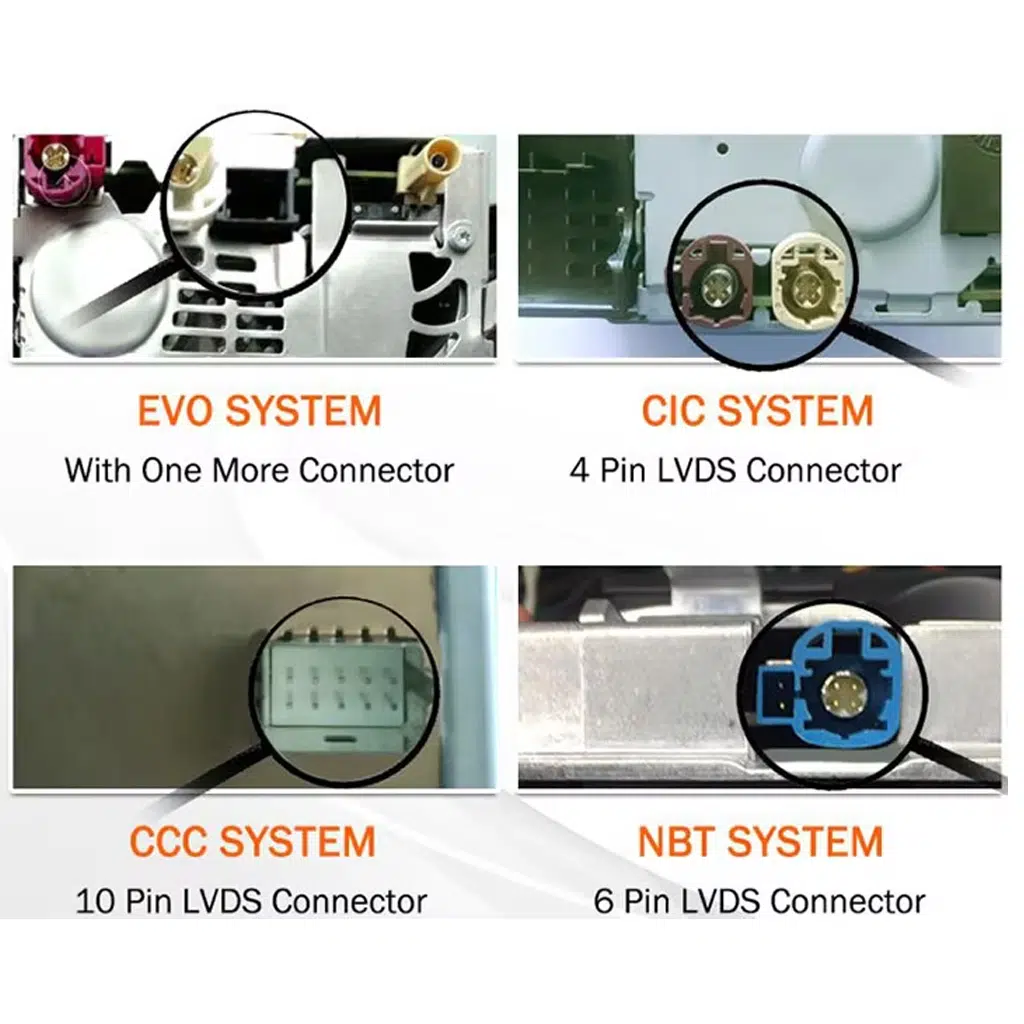
Confirm the year, F25 platform and original CIC/NBT or instrument configuration before shipment.
For eligible destinations, select the DDP tax-included shipping route when it is available at checkout.
Product identification and vehicle information stay connected to the original order.
The support relationship does not simply disappear when the 12-month hardware period ends.
BMW X3 F25 Upgrade Guide: How DDP Shipping Can Remove the Customs Surprise
You have already decided to spend money improving the BMW. The last thing you want is a courier message after shipment asking for another unexpected import payment before delivery.
For an eligible DDP route that is expressly selected or confirmed before shipment, the supported import duties and applicable tax/VAT covered by that route are included in the agreed shipping arrangement.
This gives the buyer a clearer idea of the real landed cost instead of comparing only the product price and leaving customs as an unknown amount at the destination.
DDP applies only when the tax-included option is clearly offered and selected at checkout or confirmed by iKAGOO before shipment.
If DDP is not expressly selected or confirmed, standard-shipping import charges remain the customer's responsibility.
DDP availability can depend on destination, order value, package size and available logistics route.
BMW X3 F25 Upgrade Guide: What Happens If the Screen or Cluster Has a Problem Years Later?
No responsible automotive-electronics seller can promise that hardware will never fail. The more important question is whether your original product can still be identified and whether there is still a practical route to software help, parts or an upgrade later.
Eligible products use iKAGOO's current 12-month limited commercial hardware warranty, subject to the warranty terms.
Original purchasers of eligible products receive remote software troubleshooting, recovery guidance and compatible available software support.
iKAGOO helps assess compatible parts, repair routes or newer compatible solutions. Parts, shipping and physical repair may be chargeable.
If a screen stops working two years later, the first question should not automatically be “Where can I buy another complete unit?” The original order can be used to identify the supplied version and help determine whether the issue is software, wiring, display hardware, mainboard hardware or another part of the system.
If a compatible part is needed several years later, iKAGOO's parts-and-upgrade support route can be used to assess available replacement, repair or newer compatible solutions rather than forcing the customer to start again with an unknown product.
BMW X3 F25 Upgrade Guide: Buying for a Family Member, Client or Customer
You do not need to personally identify every BMW electronic option. Start with the exact year and send clear photos of the original screen, dashboard or instrument cluster.
Tell iKAGOO whether the owner mainly wants CarPlay, a larger center display, a digital instrument panel or a complete cockpit upgrade.
Workshops care about more than whether the display powers on. Original controls, camera route, system configuration and complete function testing should be considered before the dashboard is fully reassembled.
Correct product identification also matters later if the customer returns with a software or hardware question.
BMW X3 F25 Upgrade Guide: Three Reasons This Upgrade Path Makes Sense
These three indicators focus on what matters after the excitement of seeing a new display: how much the upgrade changes daily use, how well it can remain connected to the BMW and whether there is still a support route after the sale.
The center screen and instrument cluster are two of the parts you interact with most often. Changing the right one creates a visible benefit on nearly every journey.
Vehicle-specific CIC/NBT review and retained BMW information make the upgrade more meaningful than simply placing a universal display in the cabin.
DDP availability, identifiable hardware, installation support and the 1Y / 3Y / 5Y support framework reduce uncertainty beyond the day of purchase.
BMW X3 F25 Upgrade Guide: Screen, Cluster or Both — Which Route Fits You?
| Your Situation | What You Want to Improve | Recommended Starting Route | Why iKAGOO Adds Value | Следующий шаг |
|---|---|---|---|---|
| Original center screen feels old or too limited | Navigation, CarPlay, Android Auto, media and everyday phone use | Головное устройство Android | CIC/NBT and dashboard review before shipment | View product → |
| Center screen is acceptable but analog gauges make the car feel old | Driver-facing digital cockpit | Цифровая панель 12.3″ | F25-specific route with order-linked support | View product → |
| Both front displays feel dated and you plan to keep the BMW | More consistent modern cockpit | Screen + Cluster | One vehicle, one support route | Confirm both → |
| US or EU buyer concerned about unexpected import charges | More predictable landed cost | Select eligible DDP option | Supported duties/taxes included in confirmed DDP route | Read DDP policy → |
| Keeping the X3 for several more years | A support route if software or hardware needs attention later | Buy through an identifiable long-term supplier | 1Y hardware · 3Y software · 5Y parts/upgrade support | View support policy → |
BMW X3 F25 Upgrade Guide: Compatibility, Installation, Shipping and Long-Term Support
BMW X3 F25 Upgrade Guide: Questions Buyers Ask Before Ordering
BMW X3 F25 Upgrade Guide: What should I upgrade first on a 2011–2017 BMW X3?
Upgrade the part that currently limits your ownership experience most. Choose the Android screen when center-display usability, navigation and phone integration are the problem. Choose the digital cluster when the driver's instrument area is what makes the cabin feel dated.
BMW X3 F25 Upgrade Guide: Does this cover 2011, 2012, 2013, 2014, 2015, 2016 and 2017 models?
Да. The current iKAGOO X3 F25 routes in this guide cover the 2011–2017 F25 generation, subject to original system and vehicle-configuration confirmation.
BMW X3 F25 Upgrade Guide: Can I add CarPlay to my F25?
Да. The current F25 Android head unit supports wireless Apple CarPlay, and the current F25 digital cluster also supports Apple CarPlay. Choose the route according to where you want the upgrade to change your driving experience.
BMW X3 F25 Upgrade Guide: Does the digital cluster support Android Auto?
Да. The current BMW X3 F25 Digital Cluster lists both Apple CarPlay and Android Auto as supported functions.
BMW X3 F25 Upgrade Guide: What is CIC or NBT and why does it matter?
CIC and NBT identify BMW infotainment-system generations that can affect which Android-screen version your vehicle requires. Clear original dashboard and screen photos give iKAGOO a practical basis for checking the correct route.
BMW X3 F25 Upgrade Guide: Should I buy the screen and digital cluster together?
Consider both when you plan to keep the F25 and both the center display and driver's instrument area already feel dated. If only one area bothers you, upgrade that one first rather than replacing a part you still like.
BMW X3 F25 Upgrade Guide: Can I upgrade in stages?
Да. You can begin with the screen or digital cluster and add the second upgrade later. Starting with the part you interact with most makes the first purchase easier to justify.
BMW X3 F25 Upgrade Guide: Will I have to pay customs duties after delivery?
If an eligible DDP tax-included shipping option is offered and you select it at checkout, the supported import duties and applicable taxes included in that confirmed DDP route are handled as part of the shipping arrangement. If DDP is not selected or confirmed, normal import charges may remain the buyer's responsibility.
BMW X3 F25 Upgrade Guide: Is DDP available for US and European buyers?
iKAGOO currently offers DDP / tax-included routes for eligible United States orders and supported European Union destinations when the option is available and selected. Availability can depend on product, package, destination and current logistics route.
BMW X3 F25 Upgrade Guide: What happens if the product fails after one year?
The end of the 12-month commercial hardware warranty does not automatically end the support relationship. Eligible original purchasers remain connected to the applicable 3-year remote software and 5-year parts / upgrade support routes. Out-of-warranty parts, shipping and physical repair may be chargeable.
BMW X3 F25 Upgrade Guide: Does the five-year support mean a five-year free warranty?
Нет. The hardware warranty, software-support period and parts / upgrade support period are separate commitments. Five-year parts and upgrade support does not mean five years of free replacement hardware.
BMW X3 F25 Upgrade Guide: What if a replacement part is discontinued years later?
iKAGOO can assess a compatible part, repair route or newer compatible product where a practical solution remains available. Long-term support does not guarantee that every discontinued component will remain permanently in stock.
BMW X3 F25 Upgrade Guide: Can a local BMW or car-audio installer fit these products?
An experienced automotive-electronics installer is an appropriate route when professional installation is preferred. Supported controls, audio, cameras and vehicle information should be checked before the dashboard is completely refitted.
BMW X3 F25 Upgrade Guide: What should I send iKAGOO if I am not sure which version I need?
Send the exact vehicle year and clear photos of the original dashboard, screen or cluster. Include steering position and any relevant factory audio, camera or previous aftermarket modifications you know about.
BMW X3 F25 Upgrade Guide: Why buy from iKAGOO instead of the cheapest seller?
Because the lowest product price is not necessarily the lowest ownership cost when fitment, customs, installation and future support are still unknown. iKAGOO combines vehicle review, optional eligible DDP shipping, order-linked technical support and a defined long-term ownership-support route.
BMW X3 F25 Upgrade Guide: Keep the X3 You Still Like and Modernize What Now Feels Old
Если ваш 2011–2017 BMW X3 F25 still gives you the driving position, practicality and ownership experience you want, an outdated display is not a reason by itself to replace the whole vehicle.
Choose the Android head unit when the center screen, navigation and phone experience are what bother you. Choose the digital cluster when the analog driver's view is what dates the cabin. Choose both when you plan to keep the BMW and want the front cockpit to feel consistent again.
Then look beyond the installation day: confirm the vehicle before shipment, choose DDP where available if you want a clearer import-cost route, and buy from a supplier that can still identify the product if you need software, parts or technical help years later.
One BMW. One vehicle history. One support route.








Add comment
Для отправки комментария вам необходимо авторизоваться.