


Модернизация цифровой приборной панели VW Golf Mk6: синхронизация карт CarPlay, переключаемые виды и водительское место, которое ощущается как новое
Ухоженный Golf Mk6 всё ещё может быть именно тем автомобилем, которым вы хотите владеть. Размер подходит, посадка знакома, а GTI или Golf R всё ещё способны сделать обычную поездку приятной.
А затем вы смотрите через руль, и оригинальные аналоговые приборы сразу напоминают, из какого поколения пришёл салон.
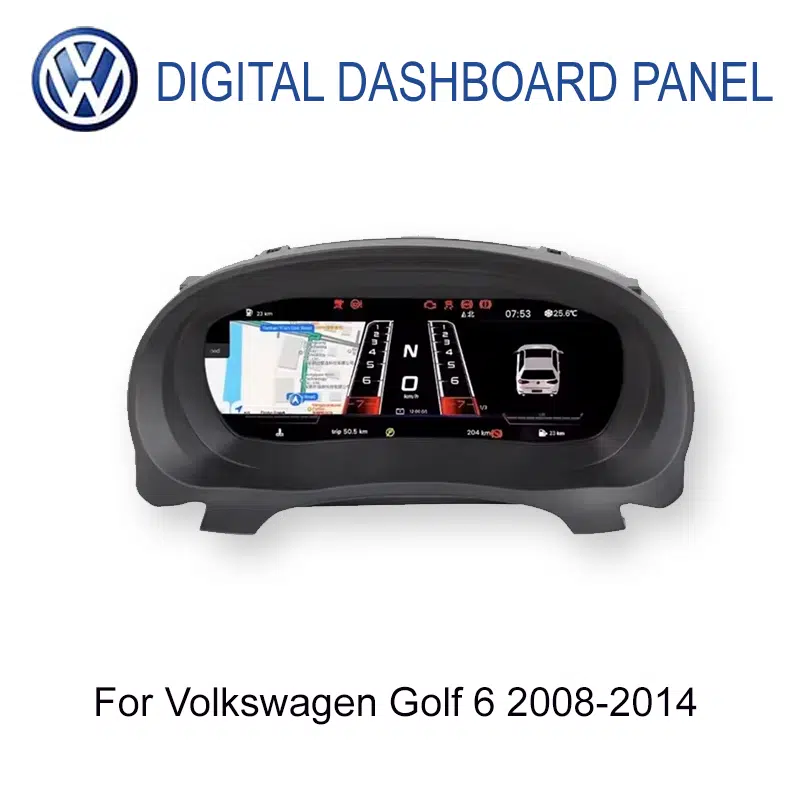
A Обновление цифровой приборной панели Golf Mk6 меняет этот вид с помощью 12.3-дюймовой ЖК-панели, переключаемых дисплеев приборов, поддерживаемых данных оригинального автомобиля и — при правильно подобранном маршруте —CarPlay и синхронизации карт прямо на дисплее приборов.
Стоит ли обновление цифровой приборной панели Golf Mk6?
Для владельца Golf 6 2008–2014 годов, который регулярно пользуется автомобилем и планирует оставить его себе, это может быть серьёзным улучшением, потому что оно модернизирует ту часть салона, которую вы видите в каждой поездке, позволяет переключать доступные виды приборов, держит поддерживаемую вождению информацию перед вами и может добавить отображение CarPlay/карт через подобранный мультимедийный маршрут.
Это особенно убедительно, когда сам Golf всё ещё кажется правильным, но фиксированная зона аналоговых приборов теперь кажется старше остальной части автомобиля.
Что на самом деле кажется старым в оригинальной приборной панели Golf Mk6?
Оригинальные приборы Golf 6 не были плохо спроектированы. Многофункциональные дисплеи Volkswagen в более высоких комплектациях уже показывали полезную информацию о поездке и автомобиле. Проблема в том, что происходит после ещё одного десятилетия владения: полезная информация всё ещё представлена внутри компоновки приборов, которая в основном фиксирована.
Автомобиль может казаться моложе, чем выглядит приборная панель.
Хороший Mk6 может всё ещё ощущаться собранным и знакомым на дороге, но две большие механические шкалы и небольшая центральная информационная зона делают возраст кокпита очевидным каждый раз, когда вы его запускаете.
Оригинальный автомобиль уже знает полезную информацию — но пространство дисплея ограничено.
Информация о поездке, данные о топливе и состояние автомобиля уже могут существовать в оригинальной системе. Ограничение в том, сколько из этой информации должно помещаться внутри относительно небольшого центрального дисплея между фиксированными аналоговыми датчиками.
Та же компоновка приборов следует за вами в любом виде поездки.
Оригинальные спидометр и тахометр выполняют свою работу, но они не меняются, потому что сегодня это поездка на работу, долгий путь по автомагистрали или выходная поездка на вашем GTI или Golf R.
Возможно, у вас уже есть современный CarPlay в центре — и вид эпохи 2010 перед вами.
Обновление радио или центрального экрана решает вопросы подключения телефона, музыки и навигации, но оно не меняет комбинацию приборов прямо за рулём.
Можно ли свободно менять цифровой кокпит Golf Mk6?
Да. Доступные параметры приборов и виды отображения можно переключать из меню комбинации приборов.
Это меняет опыт владения сильнее, чем предполагает спецификация. Оригинальная комбинация Golf даёт вам одну базовую визуальную структуру каждый день. Цифровой кокпит позволяет выбрать доступное представление в зависимости от того, что вы хотите видеть.
Текущая документация продукта включает различные стили циферблатов и режимы, такие как более чистый повседневный, ориентированный на навигацию и спортивный. Точная доступная графика зависит от поставленной версии системы.
Почему это важно в повседневном использовании?
Потому что кастомизация становится значимой только тогда, когда вы видите её снова и снова.
В понедельник утром вам может понадобиться чистый, простой дисплей. В длительной поездке вы можете предпочесть макет, который делает другую информацию более заметной. Если вам нравится визуальная сторона вождения вашего Golf, возможность снова изменить кокпит позже не даёт апгрейду ощущаться как ещё одна фиксированная замена детали.
В этом разница между заменой старой комбинации приборов и и предоставлением водителю настраиваемого кокпита.
Это также означает, что апгрейд не зависит полностью от CarPlay или навигации для своего оправдания. Даже когда вы знаете маршрут и ваш телефон остаётся в кармане, сам дисплей водителя изменился.

Поддерживает ли цифровой кокпит Golf Mk6 CarPlay и синхронизацию карт?
Да. Поддерживаемый маршрут Golf Mk6 может отображать информацию, связанную с CarPlay, и синхронизировать совместимый навигационный контент на дисплее приборов, когда сопоставлены правильный мультимедийный и соединительный маршруты.
Это не означает, что комбинация приборов является Android-головным устройством или что она самостоятельно создаёт CarPlay. Подключение телефона, выход головного устройства и путь отображения комбинации приборов всё ещё должны работать вместе.
Почему это полезно, если у вас уже есть центральный экран?
Потому что центральный экран и приборная панель выполняют разные задачи.
Центральный экран остаётся лучшим местом для полного интерфейса CarPlay, музыки, звонков и полной карты. Приборная панель может приблизить полезную информацию о маршруте к той же зоне, где вы уже проверяете скорость и данные о движении.
Это становится полезным на незнакомом съезде с автомагистрали, при череде городских поворотов, у входа в отель ночью или в любой поездке, где вы предпочли бы не переводить внимание обратно на центральный дисплей.
Что меняет это обновление в течение обычной недели?
Вы знаете маршрут. Вы всё равно видите кокпит.
В большинстве дней поездок на работу навигация вообще не нужна. Вы заводите Golf, проверяете топливо и скорость и едете по той же дороге, которую уже знаете.
Вот почему визуальное обновление важно: ему не нужен особый случай, чтобы быть полезным. Новый вид для водителя уже здесь, прежде чем вы выедете с подъездной дорожки.
Теперь CarPlay и синхронизация карты становятся практичными, а не декоративными.
У вас по-прежнему есть полный интерфейс навигации на центральном дисплее, а правильно согласованный маршрут приборной панели может выводить совместимую информацию карты на дисплей водителя.
Преимущество не в “двух экранах CarPlay”. Оно в том, что полезная информация о маршруте оказывается ближе к тому месту, куда ваши глаза и так обращены во время поездки.
Вам хочется поехать домой более длинной дорогой.
Фиксированная аналоговая приборная панель выглядит одинаково, стоите ли вы в пробке или действительно наслаждаетесь тихой дорогой в GTI или Golf R.
Возможность переключать доступное представление дисплея придаёт кокпиту немного той же индивидуальности, которая поддерживает интерес многих владельцев к самому автомобилю.
Ночью разницу становится труднее игнорировать.
Зона приборов — одна из основных освещённых поверхностей в поле зрения водителя. Поэтому полноценный цифровой дисплей меняет воспринимаемый возраст кокпита гораздо сильнее, чем ещё один небольшой аксессуар для салона.
Скорость, топливо, состояние автомобиля и информация о маршруте остаются актуальными часами.
В длительной поездке по автомагистрали ценность не в том, чтобы нажимать больше кнопок. Она в том, чтобы информация об автомобиле, которой вы постоянно пользуетесь, была организована в более современном дисплее водителя на протяжении всего пути.
Если двигатель, коробка передач, сиденья, размер и практичность по-прежнему вас устраивают, замена всего автомобиля только ради более нового кокпита — совсем другое решение, чем замена самого кокпита.
Цифровая приборная панель не будет делать вид, что Golf 2010 или 2012 — это новая машина. Она делает нечто более реалистичное: обновляет одну из тех частей салона, с которыми вы взаимодействуете в каждой поездке.
Для владельца, который рассчитывает сохранить Mk6 ещё на три, четыре или пять лет, эта повторяющаяся ежедневная ценность — одна из самых сильных причин, по которым обновление имеет смысл.
Будет ли цифровая приборная панель по-прежнему показывать оригинальную информацию о движении Golf?
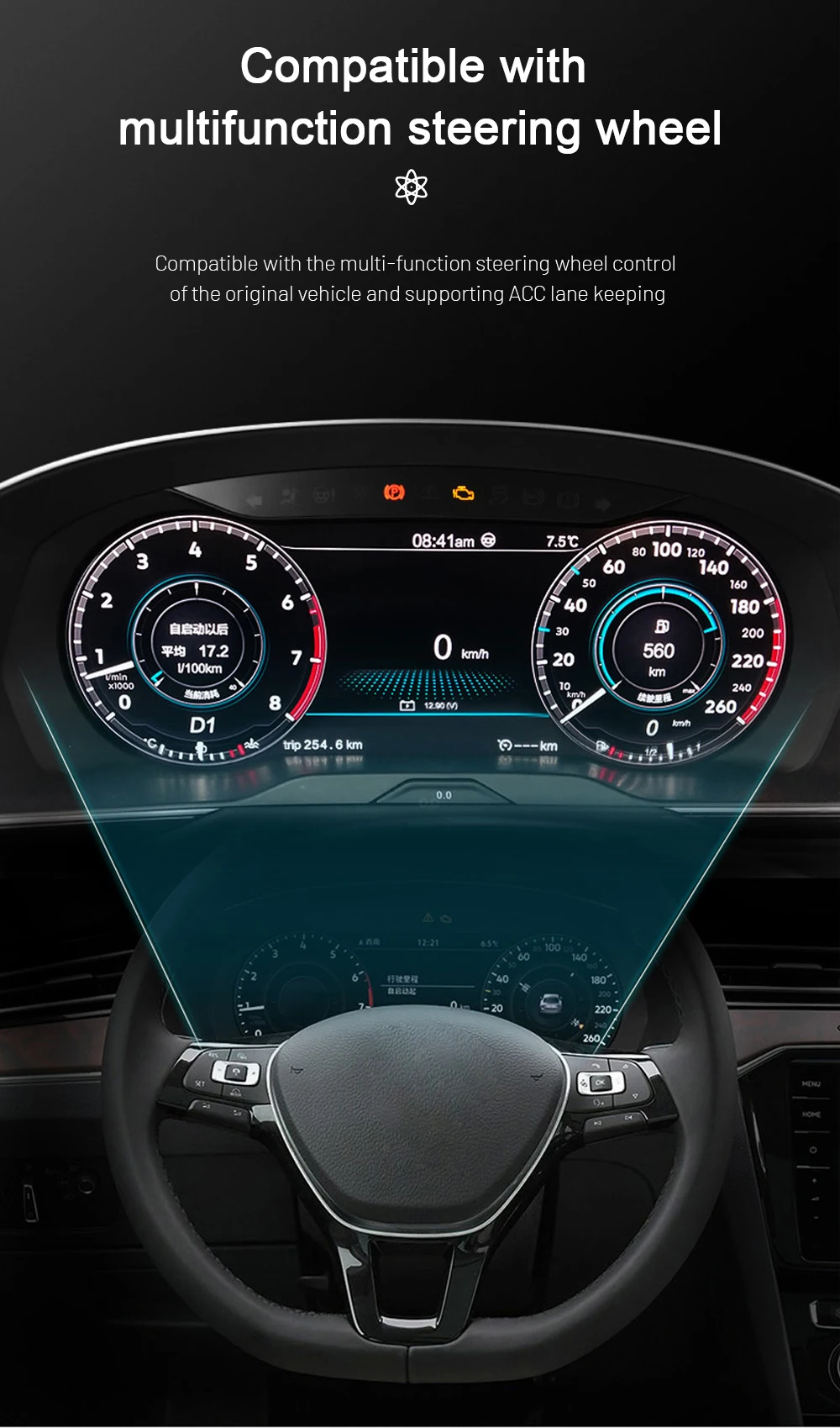
Yes, on the correctly matched configuration. The current Golf 6 route retains supported everyday driving information instead of turning the instrument area into a decorative LCD screen.
Supported driving-status and warning information remain available after correct connection and setup, and supported multifunction steering-wheel interaction is retained through the appropriate vehicle-interface route.
This matters because the best-looking display is still a poor upgrade if it stops behaving like an instrument cluster.
The iKAGOO matching process therefore looks at the actual original cluster, steering side, connector configuration and expected functions—not only the words “Golf Mk6” on the order.
Which 2008–2014 Golf 6 Models Can Use This Digital Cockpit?
The current product range covers Volkswagen Golf 6 / Golf Mk6 / Golf VI / Typ 5K vehicles from 2008–2014. There is an important evidence boundary between the product range and the currently documented installation procedure.
The current product route also checks LHD/RHD configuration and body-style differences. A model badge or production year alone is therefore useful for starting the match, but it is not the final preparation decision.
You do not need to treat this as a reason to delay the purchase indefinitely. The normal process can be: choose the product and place the order, provide the requested year, LHD/RHD and original-cluster information, then let the stricter final configuration review happen before the unit is prepared and dispatched.
What Does a Real Golf Mk6 Digital Cluster Installation Involve?

This is a proper dashboard retrofit, not a clip-on accessory. The original cluster and surrounding trim have to be handled carefully, and the relevant retained components, connectors, settings and functions need to be checked before final reassembly.
For the matched supported route, intentional cutting of the original factory wiring is not part of the normal installation plan. That does not make it a five-minute job; dashboard handling and complete final testing still matter.
The practical difference of the supported iKAGOO route is that your installer can start with a Golf 6-specific reference. If the actual frame, connector or behaviour differs from the documented route, the sensible next step is to stop and verify the difference rather than force the installation.
Three Checks That Matter Before You Spend the Money
These are the current Golf 6 product results. They answer three different buyer questions: is the upgrade worth doing, how closely can the route match the original car, and how seriously should the installation be treated?
Very strong if this is a Golf you intend to keep
The score is high because the original instrument area is one of the clearest visual age points in the Mk6, the new cockpit is visible every drive, supported vehicle information remains useful, the display can be changed to suit the driver, and CarPlay/map display can add another recurring benefit on the correct route.
It stops short of 99 because a healthy original analogue cluster still performs its basic job well. If you love the factory gauges or will sell the car soon, the upgrade becomes more preference than necessity.
Strong vehicle-specific fit without pretending every Golf is identical
The Golf-specific dashboard route, retained vehicle-data direction, steering-wheel support, connector matching and real PQ installation evidence create a strong compatibility case.
It is not presented as 100/100 because regional versions, LHD/RHD, body style, original cluster structure, connector route, previous modifications and map-display requirements can change the final configuration.
A real retrofit that deserves a competent installer
The matched route does not plan intentional factory-wire cutting, but the job still requires dashboard trim removal, original-cluster handling, matched connections, configuration and full function testing.
An experienced DIY installer may be comfortable with L3 work. For most owners, an automotive-electronics installer is the easier choice. If the cluster frame or connector differs from the documented route, stop before forcing parts together.
Why Doesn't It Make Sense to Treat Every Golf Mk6 Digital Cluster as the Same Product?
Because the part you can compare most easily—the LCD screen—is not the part that usually creates the difficult questions.
The difficult part is whether the correct cluster arrives for the actual Golf, whether the original information and controls behave as expected, whether the CarPlay/map route matches the installed multimedia system, and whether somebody can still identify the product later if your installer needs help.
If all you need is the lowest-priced screen and you are comfortable solving those questions yourself, cheaper marketplace listings exist. iKAGOO is intended for owners who want the hardware and the support route to remain connected.
Eligible hardware is covered by the current 12-month limited hardware warranty. After the commercial warranty period, troubleshooting, software guidance, parts support and repair coordination may still be available; out-of-warranty costs can apply.
Useful Guides Before You Upgrade
Golf Mk6 Digital Cockpit Upgrade FAQ
Is a Golf Mk6 digital cockpit upgrade worth it?
It can be a strong upgrade for a Golf 6 you drive regularly and intend to keep. The cockpit changes every journey, the available display views can be switched, supported vehicle information remains available, and the correctly matched route can add CarPlay and map synchronization to the instrument display.
If you prefer the original analogue instruments or expect to sell the Golf soon, leaving it original can make more sense.
Does the Golf Mk6 digital cockpit support CarPlay?
Yes, on the supported matched connectivity route. CarPlay-related information can be displayed through the appropriate phone-link or connected multimedia path.
The cluster is not an Android head unit or independent CarPlay box, so the installed head unit, cluster version and interconnection route still matter.
Can Google Maps, Waze or Apple Maps be synchronized to the Golf 6 instrument cluster?
Compatible navigation content can be displayed in the cluster when the required multimedia and projection route is present. Google Maps, Waze or Apple Maps availability therefore depends on the source system and connection route, not simply on the LCD screen itself.
If map synchronization is one of your main reasons for buying, include the centre-screen/head-unit information with the order so the appropriate route can be checked.
Can I freely switch the Golf Mk6 digital cockpit parameters and display views?
Yes. The available instrument parameters and display views can be changed from the cluster menu. The current product route includes multiple style directions, including cleaner everyday, navigation-focused and sport-style displays where supported by the supplied version.
The exact graphics and available options follow the confirmed system version, so not every marketing image should be interpreted as a promise that every version has the identical menu.
What years does the Golf Mk6 digital cockpit support?
The current product range covers Golf 6 / Golf Mk6 / Golf VI / Typ 5K models from 2008–2014. The detailed published PQ installation guide currently documents the 2009–2014 route, so 2008 vehicles should have the original cluster frame and connector arrangement matched before final preparation.
Will speed, RPM, fuel, trip information and warning data still display?
Да, по правильно подобранному маршруту. Current Golf 6 product documentation confirms supported speed, RPM, fuel, trip, driving-status and warning information after correct connection and setup.
Will the multifunction steering-wheel controls still work?
Supported multifunction steering-wheel interaction remains available on the matched vehicle-interface route. Exact menu behaviour can vary with the original Golf configuration, so it should be included in final function testing before dashboard reassembly.
Is this an Android instrument cluster?
Нет. This product is a dedicated LCD digital instrument cluster for the Golf 6 dashboard. It should not be confused with an Android head unit or a universal Android tablet installed behind the steering wheel.
Is this a factory Volkswagen OEM Virtual Cockpit retrofit?
Нет. It is an aftermarket iKAGOO LCD digital cockpit designed for an OEM-style Golf 6 installation direction. It should not be described as an original factory-coded Volkswagen Virtual Cockpit.
Does the digital cluster fit a Golf Mk6 GTI or Golf R?
GTI and Golf R are included in the documented 2009–2014 Golf 6 PQ installation coverage when the original cluster/frame matches the supported route. The final match still uses the actual original cluster, dashboard and connector configuration rather than the GTI or R badge alone.
What about Golf Variant, Estate, Wagon or Cabriolet?
Golf Cabriolet is included in the documented 2009–2014 PQ installation route. Variant, Estate and Wagon versions are part of the current product fitment review, but their body-style name alone is not enough to confirm the exact dashboard and connector route.
Do I need to cut the original Golf wiring?
Intentional cutting of supported factory wiring is not planned on the normal matched route. The retrofit still involves trim removal, original-cluster handling, matched connections, configuration and final testing. Previous wiring modifications or unusual connectors should be disclosed before final preparation.
Can I install the Golf 6 digital cluster myself?
The current iKAGOO Installation Ease result is L3 — Advanced DIY. An experienced DIY installer with automotive-electronics experience may be comfortable with the work, but many owners will prefer a professional automotive-electronics installer because the original cluster and dashboard have to be handled carefully.
Why buy a Golf Mk6 digital cluster from iKAGOO instead of a cheaper marketplace listing?
The LCD hardware is only one part of the retrofit. The vehicle year, steering side, original cluster, connector route, expected retained functions, CarPlay/map-display requirement, installation reference and later technical support all affect whether the upgrade becomes a usable result.
iKAGOO keeps those items connected to the order so the buyer is not expected to solve the entire vehicle-specific route alone after the parcel arrives.
Do I have to complete a compatibility check before I can order?
Not as a default barrier. You can select the product and place the order, then provide the requested Golf year, LHD/RHD information and original-cluster/dashboard photos. The vehicle-specific review takes place before final product preparation and dispatch.
If the car has previous dashboard or wiring modifications, or you need a specific CarPlay/map synchronization route, supplying those details early helps the correct configuration be prepared.
What support is available after installation?
The original order remains the reference for installation questions, troubleshooting, supported software guidance, compatible parts and repair coordination. Eligible hardware currently carries a 12-month limited hardware warranty. Support can continue after the warranty period, although out-of-warranty parts, repairs or shipping may involve additional cost.
Keep the Golf You Still Enjoy. Upgrade the View You See Every Day.
A Обновление цифровой приборной панели Golf Mk6 does not make sense because there is something inherently wrong with analogue gauges.
It makes sense when the Golf itself still deserves to stay in your driveway, but the driver's view no longer feels like the car you want to sit in for the next several years.
The 12.3-inch display changes that view. The available instrument parameters and modes can be switched. Core supported vehicle information remains part of the cockpit. And with the correctly matched route, CarPlay and compatible map information can move into the driver display as well.
If you choose iKAGOO, the next step is not simply “buy a screen and hope it fits.” The product, vehicle information, display requirement, installation reference and later support remain connected to the same order.
Product range: Volkswagen Golf 6 / Golf Mk6 / Golf VI / Typ 5K 2008–2014. The detailed published PQ installation route currently documents 2009–2014 vehicles; 2008 vehicles require original-cluster/frame and connector matching before final preparation. CarPlay and map synchronization depend on the confirmed cluster, multimedia source and connected display route.








Add comment
Для отправки комментария вам необходимо авторизоваться.